• Work With Amy
  • Blog
  • Products
  • About
  • Contact
  • Work With Amy
  • Blog
  • Products
  • About
  • Contact

Succeed With Content - Staging

Successful Content Strategies for Profitable Income Streams That Are Easy to Maintain and Grow

  • Work With Amy
  • Blog
  • Products
  • About
  • Contact
  • Work With Amy
  • Blog
  • Products
  • About
  • Contact

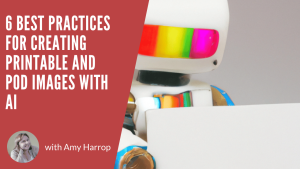
6 Best Practices for Creating Printable and POD Images with AI

August 15, 2024 By Amy Harrop

6 Best Practices for Creating Printable and POD Images with AIYou can’t go anywhere online without seeing articles talking about artificial intelligence or content and images created with AI tools such as DALL-E 3 or Starry.ai. The question looming for many of us who create digital products using AI is this:


What are the best practices for using AI to create digital products?

It’s an important question to ask and a potentially tricky one to answer. We’re at a time when the AI landscape is shifting under our feet. We’ve outlined some best practices for where we are, and at the end, we’ll provide some tips to help you keep up with where we think AI might go in the future.

Best Practice #1: Choose Your AI Image Tools Wisely—and Learn How to Use Them
One of the biggest roadblocks that can prevent you from creating professional-looking (and sellable) images generated by AI is a lack of knowledge about the tools you use to create images. Some of them are easier to learn than others, so it’s important to play around and get to know them before you create images to sell.

Some tools (think Canva) are easier to use than others. If you’re not willing to spend a lot of time fiddling around with features to determine how to get the best images possible, then you might want to stick with tools with simple interfaces.

Best Practice #2: Fine-Tune Your Prompts

AI image generation tools are only as good as the information you give them. There are two types of prompts: text and visual. With a text prompt, you’ll write a description of the image you want. You’ll need to be specific and keep in mind that most AI tools are extremely literal in their understanding of text. With an image prompt, you’ll supply an “inspiration image” for the AI tool to use.

If you’ve got a specific style in mind, it’s worthwhile to spend some time training the AI tool you choose. For example, DALL-E 3, from OpenAI, will remember your prompts, meaning you can get to a point where you’re happy with the style or color palette and use it many times.

Best Practice #3: Use Your AI-Generated Image as a Starting Point
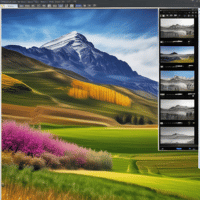
There are a lot of people using AI tools to create images, so it’s essential not to simply copy and paste an image created by AI and put it on your products. Instead, you’ll need to take the image AI gives you and refine it. There are two ways to do it.

  1. Refine your prompts to fine-tune the image and make it your own; or
  2. Use image editing software (which may be included in the AI tool you’re working with) to filter, crop, and otherwise alter the image.

Editing is necessary because, as much as you might like to think you’ve dreamed up a unique image, the chances are high that someone else has requested the same thing from the same generator.

Best Practice #4: Check Your Images for Copyright Infringement
After you’ve edited your AI-generated image, you’ll need to check it for similarities to copyrighted images on the web. This step is especially important if you’ve used an image that isn’t yours as part of your prompt. The issue of copyright is murky when it comes to AI images. Who owns them? You’ll need to make sure that your images are unique.

One of the best ways to check for issues with your images is to put the image into Google and do a reverse image search. Google Lens is the app you can use to do that. If your image is too similar to something that’s protected, then you should alter and edit it until it’s far enough away from the original for you to sell.

Best Practice #5: Add a Watermark or Overlay to Your Image
When you’re listing AI-generated images for sale, you can protect your images by adding a watermark with your brand or store name on it. A lot of Etsy sellers take this step, and we recommend it. It makes it more difficult—although not impossible—for someone to simply copy your image and resell it.

There are tons of tools you can use to add branding to your images. Canva is a notable example. Once you’ve figured out the placement of your logo or store name, you can simply create a copy of one image, drag your new image into it, and replace the background before saving it.

Best Practice #6: Stay Abreast of New Developments in AI

We’re not saying you need to become an expert on the technical aspects of AI. However, it is a good idea to read articles and stay on top of what’s happening with AI image generation and the rules around it.

Best practices are determined by where we are with AI, and they could change. One example is copyright, which is—as noted above—a frontier that AI hasn’t yet navigated. It’s likely that ownership of AI-generated images will be a topic of conversation going forward, and you won’t want to be caught by surprise when it happens.

Where Is AI Headed?

It’s amazing to think about how commonplace the use of AI has become in just a few years. We can’t say exactly where it’s headed, but here are a few possibilities to keep in mind.

  • Ethical AI. We expect there’ll be an increasing demand for regulation of AI, especially given that photorealism is a trend that we’re seeing in 2024. This has already been a topic of discussion in Hollywood, where actors are concerned that their voices and images may be used without permission.
  • Copyright and ownership. As we’ve already mentioned, ownership of AI-generated images could become a hot topic in the future, which is why it’s so important to make the images you generate unique.
  • Dynamic content creation. There’s a strong likelihood that AI prompts will evolve to incorporate clues that go beyond text and images. Some experts predict that it won’t be long before AI can respond to environmental cues as well.
  • AI-driven creativity. Finally, it’s likely that the editing and image generation tools available will soar to new heights. AI may be able to suggest fonts, color palettes, and other features to improve the quality of the images it generates.

The takeaway here is that the future of AI is likely to be exciting and unexpected. Staying on top of trends is a must, since changes may impact the way you use AI to create images to sell.

Need a little help creating images with AI tools? Check out Easy Image AI, our AI image creation tool that comes with no monthly fees and tons of useful tools, including an AI prompt generator and unlimited AI-powered image creation.

Related Posts:

  • Is Print on Demand Still Profitable Predictions & Trends
    Is Print on Demand Still Profitable? Predictions & Trends
  • AI-Driven Personalization: Creating Custom Printables on Demand
    AI-Driven Personalization: Creating Custom…
  • Are You Sleeping on Printable Greeting Cards to Boost Your Income
    Are You Sleeping on Printable Greeting Cards to…
  • If you’ve been reading this blog for a while, you know we’re big fans of personalized digital products. Personalization can make any design feel special. Creators who sell personalized products can increase their profits by charging a little extra for personalization, too. AI tools can be used to create all kinds of cool digital and printable products, and that includes personalization. Here’s your ultimate guide to using generative AI to conceptualize and create personalized products to sell in your Etsy shop or on your website. Why Is Personalization Popular? Personalized products aren’t new. If you’re over a certain age, you probably remember those kiosks at the mall where you could get almost anything personalized, from brass clocks and candle holders to cufflinks and carafes. The thing about personalization is that it can make any gift feel special. It’s one thing to give someone you love a mug, and another thing entirely to give them one that’s personalized with their name or birthday. In other words, personalization shows that you were thinking about the recipient. And of course, gifts aren’t the only type of personalized product that people love. They also like to buy personalized items for themselves and may be willing to pay extra for the personalization. That’s one of the reasons that we love personalization: it’s a profit booster! How Can AI Tools Help with Personalization? Now, let’s talk about how AI tools can help with personalization. When you’re just starting out creating digital or print on demand products, you may have a bit of a learning curve as you figure out how to leave room for personalization in your designs. If you use an AI tool such as Canva or DALL-E 3 to create a design, you can tell it to leave a space for personalization. You won’t have to worry about wasting time with designs that don’t work. You can simply ask for what you want and get it. Of course, it may take a few tries to get your prompts right. That said, it’s still less time consuming to use AI than it is to start a design from scratch. Personalized Products to Create with AI Before we get into some specific prompts to use for personalization, here are some of the personalized items you may want to consider creating. • Printable journals, planners, or calendars • Mugs • Water bottles • Apparel, including t-shirts, sweatshirts, caps, or socks • Electronic accessories such as phone or tablet cases • Wall art • Accessories such as jewelry or tote bags • Home décor items such as pillows, candle holders, vases, or coasters You may even want to go for larger items such as shower curtains, sheets, or rugs. If you can find a POD provider to print it, you can put your AI-generated images on any product you want! AI Prompts for Personalization One of the trickiest things about working with generative AI is finding the right prompts. It can be frustrating at times, but here are some ideas to get the results you want. First, we suggest starting with a description telling AI what you want it to do. Here’s an example. I want to design an image for a t-shirt and leave room for personalization, such as a person's name. Do you understand? When we use DALL-E 3, we usually get a response asking us to describe specifically what we want and where we’d like the personalization to be. That’s part of the reason we use the “do you understand” wording, because we want to be able to give a basic idea of what we’re looking for, then augment with more specifics before an image is generated. Here’s an example. I would like the design to be scales, like the ones used for the Libra astrological sign. The image should be a circle with green scales on a light purple background. There should be room for the name underneath the scales. Once you get an image, you should be able to refine it from there. Our top piece of advice is to be extremely specific since most AI tools will take your words literally. For example, if you like one element of the initial design but want to change others, you’ll need to state that explicitly or expect the thing you like to be replaced with something new. Use AI to Create a Product Mockup Once you’ve got a design you like, we highly recommend creating a product mockup. Mockups are essential when selling POD products, since they help customers imagine your design printed on the product of their choice. Two tools we like for mockups are Canva and AdCreative.ai which can be used to create professional-looking “photoshoots” of your products with AI. Keep in mind that some POD providers may have tools to help you create mockups, with or without AI. You can use whichever tools you choose. Just make sure that your mockup is clean and professional. We like to have uniform mockups that use our brand’s colors and fonts. POD Providers for Personalization After you’ve created your design and mockup, you’ll need to find a POD provider to print your products and deliver them to your customers. Here are a few of our favorites. • Printify • Printful • Redbubble • Society6 • Amazon Merch on Demand Each one of these has its benefits. Pricing varies and you’ll need to decide which provider is best suited to your needs and to the needs of your customers. Order a Sample Our final suggestion is to order a sample of your design printed on a product. It’s the only way to be sure that you’re delivering high-quality products to your customers – and you want that, because it’s one of the best ways we know to generate future sales! After you’ve received your sample – and assuming you’re satisfied with it – the only thing left to do is to list your AI-created, personalized products in your online stores and wait for the money to start rolling in. Conclusion We hope you’re inspired to start creating your own personalized products with AI! People often come to sites like Etsy looking for unique gifts, and personalization adds that extra something that may inspire them to choose your shop instead of one of your competitors. Do you need an assist creating personalized POD products? Check out Easy Personalized POD now!
    Using AI to Create Personalized Products

Filed Under: AI Tools Image Editing, Content Creation, Etsy, Kindle Publishing, Print On Demand Tagged With: AI images, AI print on demand, AI Tools Image Editing, print on demand products, printables

New Release

33.5 MILLION Families Are Searching For This…You Can Publish Your First In-Demand Printables Or Short Book In 12 Proven Parenting Sub-Niches…

CLICK HERE TO SEE MORE

We’ve launched on Substack!


Join our Substack

We’ve launched on Substack!

Join us for fresh insights delivered straight to your inbox. Subscribe to get the latest posts on content and digital business.

Subscribe on Substack

Get the Latest Training

Parenting Profits: Printables & Short Books in a Weekend

33.5 MILLION Families Are Searching For This…You Can Publish Your First In-Demand Printables Or Short Book In 12 Proven Parenting Sub-Niches… …

Learn More

The Guy Gap Goldmine

Don’t Miss Out On 50% Of The Population…Tap Into This $15 Billion Publishing Gap Today …

Learn More

Garden Goldmine: AI-Powered Publishing for Books & Printables

77% Of Americans LOVE Doing This…Here’s How You Can Tap Into The $50 BILLION Demand…The Easy Way! …

Learn More

Recent Posts

  • Your Holiday Product Timeline: What to Create and List in October and November
  • Halloween and Fall Printables That Actually Sell (A September Creation Guide)
  • Q4 Printables Prep: What to Create in August and September
  • How to Find Underserved Publishing Niches (Step-by-Step Method)
  • How to Pick KDP Keywords Buyers Actually Search For (Free Method)

Press Kit | Disclosure | Disclaimer | Privacy Policy | Terms & Conditions| Affiliates